3,663 users, 8 online now.
A total of 1,140,305 plays!

Index » Other » Client Modding » b20130303 Digital Client++

516 posts | Jump | 1 ... 31 32 33 34 35
Beyond
Cymbal Sounder
36 posts
RU Flag

4 days ago

Cloudpaw wrote:

this update completely ruined input latency on fullscreen opentk, it's like I'm stuck in windowed mode despite everything I do. maybe regression related to letterboxing


Yep idk if it's placebo but my game is choppy in letterboxed and feels kinda better in regular fullscreen
Digitalfear117
BAT Manager / Global Moderator / Mr. Ladybug
3,663 posts
US Flag

4 days ago
I’m looking into the performance regression. But I need more time to find the source, as I spent multiple hours today and cannot find the cause yet.
Avril
osu! BAT
823 posts
PH Flag

4 days ago

Cloudpaw wrote:

this update completely ruined input latency on fullscreen opentk, it's like I'm stuck in windowed mode despite everything I do. maybe regression related to letterboxing


somehow it performs like its on VSync and the only annoying fix is to change the frame limiter from Unlimited -> Unlimited (Gameplay) and Vice Versa. (atleast on my end)
Digitalfear117
BAT Manager / Global Moderator / Mr. Ladybug
3,663 posts
US Flag

4 days ago
I cannot replicate that. I get over 5000 fps, but my cursor becomes noticeably lagged out when playing, but it doesn’t happen in menus. I suspect the input manager is either being throttled accidentally, or something is up with the winform setup. The issue isn’t performance necessarily, but inputs feeling dropped for me.
Digitalfear117
BAT Manager / Global Moderator / Mr. Ladybug
3,663 posts
US Flag

4 days ago
Also interestingly, this doesn’t happen on mouse, only tablet…
Digitalfear117
BAT Manager / Global Moderator / Mr. Ladybug
3,663 posts
US Flag

4 days ago
Another thing I have noticed is that this does not seem to affect DirectX. It feels fine there… weird.
Windows 9
Rhythm Incarnate
512 posts
RU Flag

4 days ago
honestly, i haven't seen any input lag in any mode. maybe that's because im playing from integrated gpu of very modern processor and on windows 11. i dunno :(
MediatekStaff
Whistle Blower
29 posts
VN Flag

4 days ago

Windows 9 wrote:

honestly, i haven't seen any input lag in any mode. maybe that's because im playing from integrated gpu of very modern processor and on windows 11. i dunno :(

ur dotnet version?


Windows 9
Rhythm Incarnate
512 posts
RU Flag

4 days ago

MediatekStaff wrote:

ur dotnet version?

uhh… latest? :sob:
besides the joke, it's.net 10 from 64 bit digital++. you also can check my hardware on benchmark leaderboard
Digitalfear117
BAT Manager / Global Moderator / Mr. Ladybug
3,663 posts
US Flag

4 days ago
Okay I think I found the problem, it’s due to the cursor confining logic. I’ve rewritten it and hopefully I can do a hotfix tomorrow after some more testing.
BlakeBelladonna
Combo Commander
358 posts
US Flag

2 days ago
I'm not sure if it's just me, but it seems like when you've selected another gamemode, it doesn't save and resets your gamemode back to standard on the client. Not major but annoying.
Fork developer of the VRChat moderation logger‚ Scarlet․ Now working on Linux and Androidǃ
https://github.com/KozyBlake/Scarlet
Digitalfear117
BAT Manager / Global Moderator / Mr. Ladybug
3,663 posts
US Flag

2 days ago

BlakeBelladonna wrote:

I'm not sure if it's just me, but it seems like when you've selected another gamemode, it doesn't save and resets your gamemode back to standard on the client. Not major but annoying.

Confirmed and fixed for the next hotifx, thanks for reporting.
Digitalfear117
BAT Manager / Global Moderator / Mr. Ladybug
3,663 posts
US Flag

2 days ago
Major hotfix for the last release!

Bugfixes
Adding big new features always has the potential for big bugs too… and not just the Mr. Ladybug kind!

Fix Frame Limiter Being Stuck on VSYNC with NVIDIA GPUs when in OpenGL
I could not replicate this bug on my main laptop and pc, and I thought it was doomed, until I realized from people I was talking to that they all had NVIDIA GPUs, and when I pulled out my old laptop with an NVIDIA GPU I was finally able to replicate it. This is now fixed.

Do Not Reset Fullscreen on Every Mode Transition
This is just how it was originally programmed in 2015, but was later changed. Now it will no longer try to switch in and out of fullscreen unless necessary.

Add Alternative Cursor Confining Code as a Test
On my desktop I get a bit of noticeable lag when playing in OpenGL in fullscreen, and I believe it has to do with cursor confining. I'm not sure if it's placebo or a real improvement yet, so if you feel like your cursor is kind of teleporting when playing, give this option a try and let me know if things improve, I have a feeling this is just a me issue though.



Remember Last Played Game Mode when Entering Song Select for the First Time on Launch
This code was removed in 2015, they probably do this load in the ConfigManager instead because of their changes to that class, but in my client I need to still check it manually so that check is back.

New Features
Can't have an update without at least one new feature…

Press H to hide the Replay Overlay when watching Replays
Backported from Stable, but it doesn't hide the mods shown for now.

Replay Text Options
Now you can customize the text shown when watching replays!
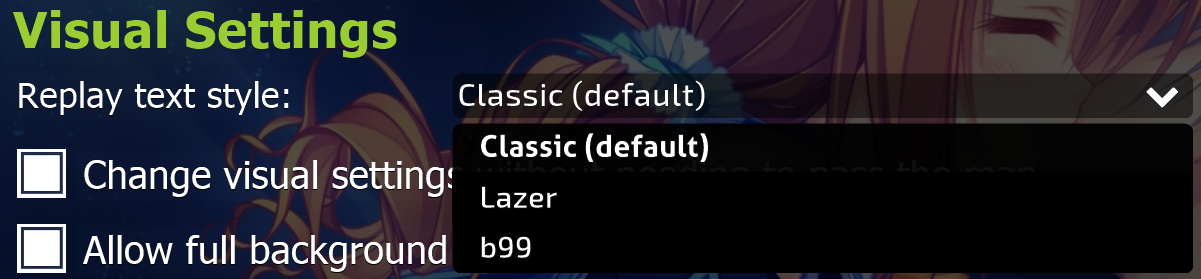


Classic:


Lazer:


b99:


THIS RELEASE WILL AUTO UPDATE IF YOU ARE ON 5.3.0 OR 5.3.14!
Thank Levi for his hard work getting this all to work.

Downloads:

64 Bit (Recommended)

Faster Titanic Download:
https://cdn.titanic.sh/digitalclient/b20130303%20Digital%20Client++%205.3.17%20x64.7z
MediaFire Mirror:
https://www.mediafire.com/file/xi8nst7rf49pfs1/b20130303+Digital+Client+++5.3.17+x64.7z/file
I'll likely stop providing a mirror in the future, so let me and Levi know if the titanic download does not work for you.

32 Bit

Faster Titanic Download:
https://cdn.titanic.sh/digitalclient/b20130303%20Digital%20Client++%205.3.17%20x86.7z
MediaFire Mirror:
https://www.mediafire.com/file/6b3u9snzvhckv11/b20130303+Digital+Client+++5.3.17+x86.7z/file
I'll likely stop providing a mirror in the future, so let me and Levi know if the titanic download does not work for you.
Last edited by Digitalfear117 1 day ago, edited 2 times in total.
Digitalfear117
BAT Manager / Global Moderator / Mr. Ladybug
3,663 posts
US Flag

1 day ago
For anyone who downloaded the 32 bit update and it didn't work, I messed up and accidentally copy and pasted the 64 bit version into the 32 bit folder.

This is the correct file: https://www.mediafire.com/file/n2b5ub9yyuq4x9d/b20130303+Digital+Client+++5.3.17+.NET+Framework+4.8+Patch.7z/file

For anyone downloaded after this post you don't need to worry about this.
Windows 9
Rhythm Incarnate
512 posts
RU Flag

1 day ago
for the next update please add ur bar from lazer🙏

516 posts | Jump | 1 ... 31 32 33 34 35
Users browsing this forum: None