

waiting for pseudolocalization..
Index » Other » Client Modding » b20130303 Digital Client++
| 223 posts | Jump | 1 ... 11 12 13 14 15 |
|
Rhythm Rookie
2 posts

|
|
|
Just send them a :MrLadybug: emoji
Last edited by Digitalfear117
4 weeks ago, edited 1 time in total.
|

|
Tempo Trainee
11 posts

|
jokes aside i usually just tell people that it's a osu client and not much else |
|
Tempo Trainee
8 posts

|
wrong name..
Previously known as: Git |
|
|
oops I had wrote that section before you name changed LOL. Thats how long ago I had started preparing release :sob: Fixed
Last edited by Digitalfear117
4 weeks ago, edited 1 time in total.
|
|
|
Quick Patch for the release of Digital Client from yesterday! There were two major audio related bugs, and we added a few more small features too!
Yesterday we included a newer version of bass, however it caused some issues with audio ramping up. Khangaroo has solved this by including an even newer version of BASS. There was also an issue with the metronome caused by the BASS update, this has been fixed osu! side! We added two new minor features as a consolation to these minor bugs, I hope you check them out! Add Dont Tint Approach Circles Option from un!stable This ensures that all approach circles are white, useful on older maps that had very dark combo colors. I might move this to the Skin Tab in the next release though…   Add Force OS Cursor Option From emsu! This forces your OS cursor to show up in osu! at all times, even when playing the game! You may need to restart your game for this to take effect. This feature also doesn't work well in replays, as there will be no cursor… yeah I'll fix this in the next release it was just supposed to be a silly addition lol. 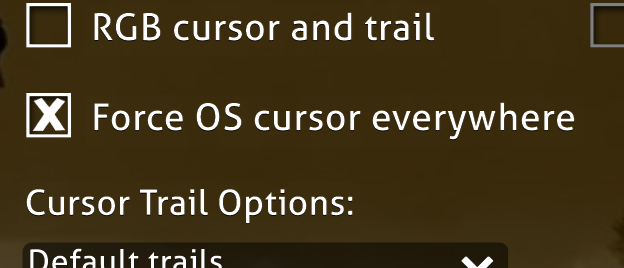 You can download the full release of version 4.4.8 here: https://www.mediafire.com/file/a9dw4rvjumqkv99/b20130303+Digital+Client+++4.4.8.7z/file If you are updating from 4.4.7 specifically, you can download these patch files for your existing install. These patch files WILL NOT work with older releases! To patch these files with 4.4.7, simply replace your existing files with these newer ones! https://www.mediafire.com/file/90k98t5qm08tvjh/b20130303+Digital+Client+++4.4.8+Update+Files.7z/file |
|
Spinner Sage
127 posts
|
Wanna see low latency audio tweaks and asio support so that some people can avoid pierdoling with linux
I really love Narumi Toa. Like, a lot. Like, a whole lot. You have no idea. I love her so much that it is inexplicable, and I'm ninety-nine percent sure that I have an unhealthy obsession. I will never get tired of installing Gentoo Linux with -o3 -march=native -flto optimization flags on an Intel Atom N570 netbook bare metal without using distcc. It is my life goal to meet up her with her in real life and have her configure my arch install for me
Isshiki Kaname@osu!Bancho | Katou Megumi@osu!Ripple | discord server |
|
Combo Commander
292 posts
|
i think that adding "integrate client to "open with" menu" feature would be a cool thing. currently yes, it's not that hard to move downloaded file handly to osu window but players are not always keeping client opened and sometimes wants to just click on downloaded file and get client opened with instantly started file import process.
another cool feature that you might want to add is "disable bg dim change during break", like in stable/lazer. also, i again have encountered ctrl+up arrow hotkey overlap in editor (with osu!next volume adjust style). take a look for this. thanks! secretly npc
|
|
|
I will look into the conflicting keybind issue in the editor at some point, ngl I keep forgetting. Also adding disable bg dim change during break shouldn't be too bad.
Not sure how to integrate the client with the open thing, but you can force digital client to take permissions for osu! file formats in the maintenance tab |
|
|
It's update time! This one is a festive themed update!
 I have spent time porting holiday features from other clients for this release! Holiday Light Show from Lazer I have recreated the Holiday Light Show seasonal effect from 2024/2025 lazer releases! When you launch the client, it will play nekodex's - circle the halls, and do a very similar light show like lazer! If you do not want this song to enable on startup you can change the Startup Song in the Global Theming section of the Theme Tab to Disabled.  I am hoping to have more Main Menu songs to select in later versions! Brand New Main Menu Gameplay Visualizer I didn't stop there though, I decided to create a new alternative theme for the main menu, this will show you a simple preview of the map itself!  You can enable this setting in the Theme Tab in Settings, under Main Menu, More Options. Change Holiday Light Show Style to "Gameplay preview". You can also disable both effects from here.  Lastly, you can change the colors of both of these visualizers in your Skin.ini.  You can learn more about the skinnable features in Digital Client by opening the Web Browser which takes you to a skinning wiki for Digital Client! Festive un!stable Cat Visualizer by Khangaroo The holiday version of the un!stable Cat Visualizer has been ported to Digital Client!  You can enable this (and the cat itself) in the Theme Tab of Settings, under Song Select, un!stable Visualizer Options. Enable the "Festive un!stable cat visualizer option". Make sure the "un!stable cat visualizer" is enabled first though!  Adjustable un!stable Song Visualizer Framerate by Khangaroo Set the framerate using "DanceFrameDivisor" in your skin.ini. The default value is 1.0.  I have created a brand new Main Menu theme inspired by osu!stream! It's not a 1:1 copy, but I wanted it to give off a similar vibe at least.  You can enable this in the Theme Tab of Settings, under Main Menu, Main Menu Interface Style, choose "osu!stream". If you have never checked these out before, there's a whole lot of them in here try some!  This screen lets you translate text using DeepL! You can access it from the translator button on the Main Menu if you are using the "Basic menu" Main Menu theme!  Do NOT use this tool to translate Digital Client Localization strings! Now you can get a much better idea how much longer you will need to wait for Beatmap Imports! I was inspired by emsu! adding the count number to each map, but I then iterated on the idea by adding the progress bar as well! So this is like 50% backport, 50% new idea xD.  We have a few new features relating to gameplay in this update! Play at Maximum Flashlight Difficulty at all Times by Noemi One of the hardest parts of Flashlight mod is that when using practice diffs you can't simulate 200+ combo flashlight size easily. Now you can! in the Gameplay Tab of Settings, under Flashlight Modifiers, enable "Force maximum Flashlight combo size"  Backported "Use combo colour tint for slider ball" This feature is from 2014, I have backported it for Digital Client!  You can enable this in the Skin Tab of Settings, under Slider Options enable "Use combo colour tint for slider ball". Remember that this needs to be enabled in your skins Skin.ini file though!  CtB - Don't Loop Hyperfruit Transformation in Modern Skin Style At some point they removed the loop on this animation, so I have done this change for Modern Skin Style. In the last update to Digital Client, I began converting hardcoded text in the client to localizable text. I have made major progress on making even more localizable! This also meant changing how the game displays text in many areas to accommodate different size text!  I want to really shout out the users who have helped actually translate text for this client. gsxr400, Nikku, Levi, Noemi, SimplyAe, Git, Avril, Oreeeee, mei4bo1lou4, February 18th, saintdeer, Nymphia, vg185, and waxei! Without you all this work to make all text localizable would be literally pointless. I also want to shoutout our Russian localizers who have translated a whopping 89% of the localizable strings in Digital Client, that's over 700 lines of text localized! These languages currently have custom localizations in progress: Japanese, German, Filipino, French, Bahasa Indonesia, Polish, Brazilian Portuguese, Russian, Romanian, and Ukrainian! We are still looking for more help with localization though! If you are interested in localizing this client for a language let me know! One thing I do want to note though is you do need to know the language you are translating for… I won't accept AI translations. Standardize Capitalization in Options I went through and rewrote and fixed all the capitalization in Options to make text consistent. And also edited a bunch of older text to try to make things easier to understand! The Editor Control Bar is Now Localizable There was a bug in the previous client that stopped this from being localizable! That has been fixed and now most of the editor is localizable!  New Editor Features I haven't forgotten about the Editor yet! There are some new features that you may find useful or cool in this update! New Editor Tip Options (and they are localizable!) Editor Tips got one hell of a glow up. For some context, when text in the editor became localizable in stable, they rewrote a lot of the editor tips to modernize them. This meant some of the old quirky tips got removed. I didn't want them to just be lost to time! In Digital Client you can now choose between 4 options. Disabled, All, Vanilla, Modern. Choosing Vanilla will give you all the classic editor tips + the custom ones. Modern will give you all the modern ones + the custom ones. All and disabled are self explanatory xd. There are also 11 new custom Editor Tips! You can change the Editor Tip Style in the Theme Tab of Settings, under Editor, Editor Tip Style.  Hitsound to Timing Point (Taikosu Rhythm Generator) by gsxr400 and Digitalfear117 This is a tool that helps one make Taikosu maps. It will map the hitsounds to new timing point so that you can keep the Taiko hitsound effects for when you are using a Taiko map as a base.  Test Beatmap in Another Mode by Khangaroo This is extremely useful for convert players, you can now test standard maps in any gamemode!  Display Title Editor is Viewable by All The Display Title Editor allows users to test and modify the beatmap artist and song text that appears while a map is playing! Before this was limited to BATs only, but now any user can view it!  To access the Display Title Editor, right click on a beatmap in Song Select. Choose the option that says "Display Title Editor"  If you are editing the Display Title for your own map, you should create the final display title you want the map to have. Then, hit the "Copy to Clipboard" option, and send the display title and the map url so that BATs can update the Display Title! Customizable Settings Screen Background In older versions of osu! the Settings screen had it's own dedicated background image! You can now re-enable this and have it work again! Bundled in this version is every single background used in Settings and you can change between them as well as skin the options-background as well!  Make sure to enable this feature if you want to use it! Go to the Theme Tab of Settings, and enable "Use old options background". Once this is enabled you can set the options-background style you want!  Customizable Key Binds for Mr. Ladybug Clicker You can now customize the tapping keys for Mr. Ladybug Clicker! Z and X are bad choices for this as you will trigger the MusicControl options using those keys though!  More osu! Cookies Two new osu! Cookies have been added to Digital Client. Somehow I missed the 2016 Christmas one entirely up until this point, I had the 2014 one but not this one whoops  Also we have this custom Titanic White Cookie based on the Modern Stable Cookie made by Waxei!  Option to Disable WinForm DPI Scaling osu! Attempts to scale WinForm assets if your windows scale is not 100%, this disables that as sometimes it breaks forms. If you are using 100% scaling this will do nothing. Lots of Bugfixes! There's a lot of bugs in this client aren't there? But overall the client doesn't seem to have exploded yet, so thats good. Lots of fixes all around this time, especially related to shaders. PeppySliderRendererGL segments now work correctly, ComboFireGL now gets squeezed down correctly (and not cropped), All the osu!Next Volume Adjusters have the correct color for the unfilled volume. Force OS Cursor now works correctly, lots of fixes relating to pText and FieldTypes. Thanks to everyone who reports bugs and helps me determine why they happen! You can download version 4.4.31 of the client here: https://www.mediafire.com/file/p3oy7lbkbpc8okz/b20130303+Digital+Client+++4.4.31.7z/file You must re-download the client to update to the latest version. Please ensure that you are not using old files, so don't just place the new files over the old ones. Copy your config, db's, skins, songs, etc. into the new version.
Last edited by Digitalfear117
5 days ago, edited 4 times in total.
|
|
|
There was a few silly little bugs in the previous release, I have pulled that one and replaced it with 4.4.31. If you were one of the 7 people who downloaded 4.4.30 please update to 4.4.31. That's what happens when you rush a release to hit a specific day D:
This update fixes 3 bugs:
+ Add App Icon Version of Waxei's Titanic Triangle Cookie https://www.mediafire.com/file/p3oy7lbkbpc8okz/b20130303+Digital+Client+++4.4.31.7z/file Thanks to all those who report bugs!
Last edited by Digitalfear117
4 days ago, edited 4 times in total.
|
|
Rhythm Rookie
4 posts

|
hi there, i've added the "disable bg dim change during break" feature! you'll have that option available in the next digital client update! as for your request with the "open with" menu integration, that is already a thing in windows if im not wrong. |
|
Combo Commander
292 posts
|
i was stupid about open with thing. i can add it by myself, by clicking "open with…" > "choose another program…" buttons. secretly npc
|
| 223 posts | Jump | 1 ... 11 12 13 14 15 |
Users browsing this forum:
None